
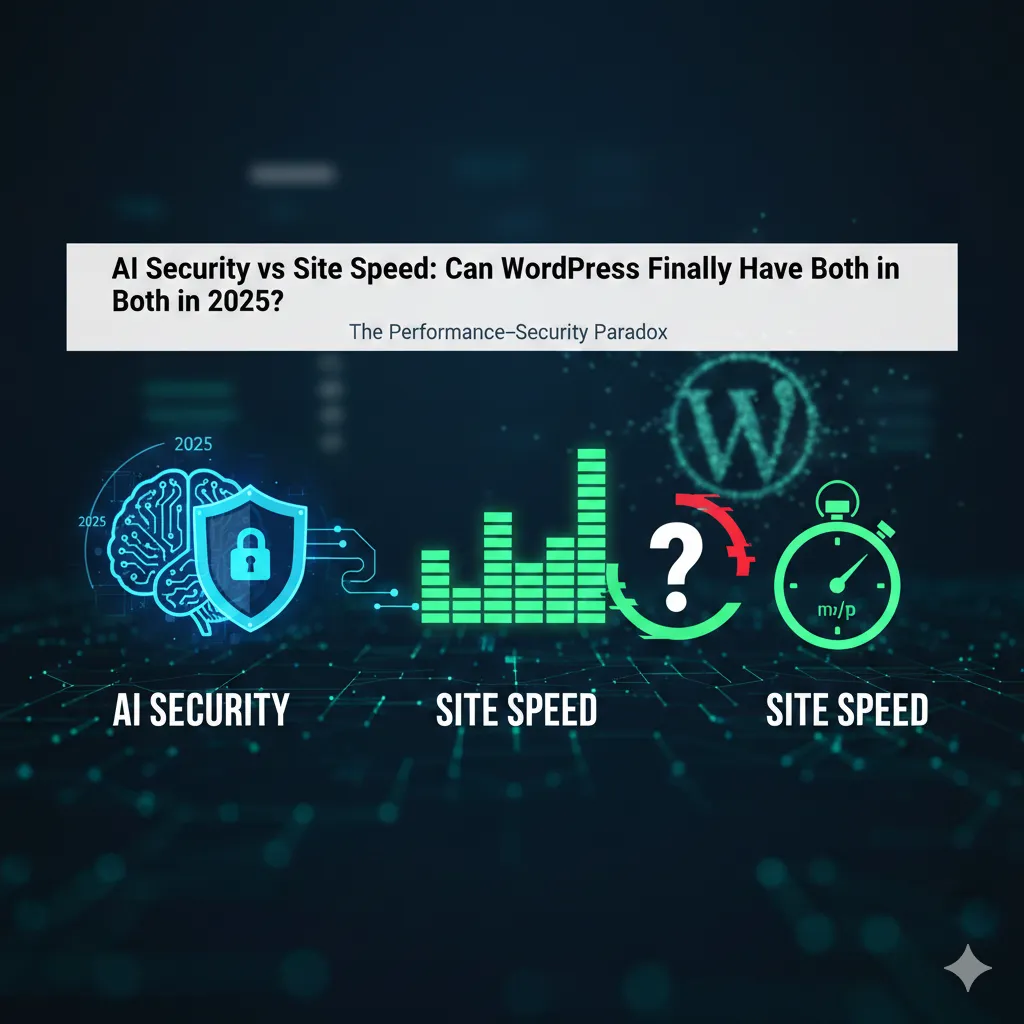
Introduction: The Performance–Security Paradox
For years, WordPress site owners have lived with an uncomfortable truth:
The moment you install a security plugin, your site gets slower.
Not slightly slower.
Noticeably slower.
Time to First Byte creeps up.
Largest Contentful Paint slips into the yellow.
Interactions feel heavy—almost sticky.
Security plugins earned a brutal nickname in performance circles: “LCP killers.”
And honestly? The label was deserved.
Traditional WordPress security was built on brute force logic—huge signature databases, constant file scans, aggressive logging, and PHP-level firewalls that inspect every single request. Each visitor, each bot, each heartbeat tick adds more work for the server.
But something changed.
AI entered the conversation—not as a buzzword, but as a structural shift in how threats are detected, filtered, and blocked. Instead of treating every request as suspicious, AI-based systems learn patterns, predict intent, and stop attacks before they ever touch WordPress.
The promise is bold:
Better security with fewer milliseconds lost.
But is it real?
Or is “AI-powered security” just the same heavy scanners with a smarter label?
This article exists to answer one question with brutal honesty:
Does AI-powered WordPress security actually improve Core Web Vitals—or just move the bottleneck somewhere else?
The Contenders: AI-Powered Plugins Under the Microscope
Not all “AI security” is created equal. Some plugins use genuine machine learning models. Others rely on centralized threat feeds. A few simply automate rule updates and call it intelligence.
Let’s break down the most talked-about contenders and examine where their intelligence runs—and who pays the performance cost.
Shield Security (MAL[ai]): Quiet Intelligence, Minimal Noise
Shield Security has always positioned itself differently. Where other plugins shout warnings and flash dashboards, Shield stays almost invisible.
Its silentCAPTCHA system is a perfect example.
Instead of interrupting users with puzzles, it evaluates behavioral signals—mouse movement, request timing, browser entropy—to determine whether a visitor is human. This happens without blocking rendering, and crucially, without injecting heavy frontend scripts.
On the malware side, Shield’s MAL[ai] detection focuses on pattern deviation, not signature comparison. That means fewer full-file scans and less frequent database access.
Performance impact:
- Low PHP execution overhead
- Minimal frontend asset injection
- Database growth remains controlled
Shield doesn’t feel fast because it skips security—it feels fast because it refuses to overreact.
Wordfence (with AI Integration): Power at a Cost
Wordfence is the most recognizable name in WordPress security—and for good reason. Its threat intelligence network is massive.
But size has consequences.
Wordfence still relies heavily on signature-based detection, even when AI assists with rule prioritization. Real-time IP blocking, live traffic views, and deep packet inspection happen at the PHP level.
Yes, AI helps refine decisions.
But the work still happens on your server.
That means:
- Regex-heavy rule matching
- Frequent database writes
- Live traffic logs competing with frontend requests
Performance impact:
- Noticeable TTFB increase on shared hosting
- Potential INP degradation during traffic spikes
- High database growth unless aggressively tuned
Wordfence is powerful—but it demands resources in exchange.
All-In-One Security (AIOS): Transitional Intelligence
AIOS represents a growing middle ground.
Its newer AI-based bot detection modules focus on request behavior profiling—flagging unusual access patterns instead of matching known bad signatures.
However, most AIOS intelligence still runs locally, and several features remain rule-based. That means performance varies wildly depending on configuration.
Used carefully, AIOS can remain lightweight.
Used aggressively, it behaves like legacy security.
Performance impact:
- Moderate TTFB increase
- Occasional admin-side lag during scans
- Frontend impact depends on enabled modules
AIOS isn’t slow—but it isn’t truly edge-native either.
MalCare: Off-Site Intelligence Done Right
MalCare quietly solved the performance-security paradox by asking a simple question:
Why should WordPress do the scanning at all?
Instead of running malware detection locally, MalCare mirrors site data to its own servers, where AI models analyze files without touching your CPU.
No heavy scans.
No massive signature databases.
No frontend interference.
Your site stays fast because the work happens elsewhere.
Performance impact:
- Near-zero TTFB change
- No main-thread blocking
- Stable Core Web Vitals even during scans
MalCare isn’t magic—it’s architecture. And architecture matters more than algorithms.
Impact on Core Web Vitals: The Benchmarks That Matter
Security plugins don’t slow sites in abstract ways. They slow specific metrics—the ones Google measures and users feel.
Let’s examine where the damage usually occurs.
TTFB (Time to First Byte): The Firewall Tax
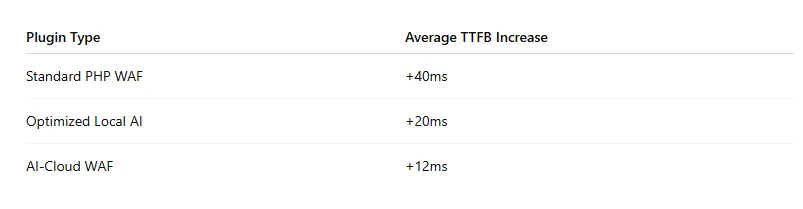
Every PHP-level firewall adds latency. The question is how much.
Traditional WAFs inspect requests after WordPress loads. That means:
- PHP initialization
- Database access
- Rule evaluation
AI-cloud WAFs stop requests before WordPress wakes up.
The difference is measurable.
INP (Interaction to Next Paint): The Silent Killer
INP reveals lag users feel—but rarely articulate.
Live traffic logging.
Background scans.
Admin AJAX calls running at the wrong time.
These steal CPU cycles from real users.
AI-based plugins that:
- Batch background tasks
- Defer scans
- Filter logging noise
…consistently outperform traditional tools.
LCP (Largest Contentful Paint): Death by Injection
Security plugins often inject:
- Anti-bot JavaScript
- Inline CSS rules
- CAPTCHA assets
Every injection risks delaying your hero image.
The fastest plugins either:
- Avoid frontend assets entirely
- Load scripts conditionally
- Offload bot detection to the edge
If your security plugin touches the frontend, LCP is always at risk.
Comparison Table
Technical Deep Dive: Why “AI” Security Is Actually Faster
AI isn’t faster because it’s smarter.
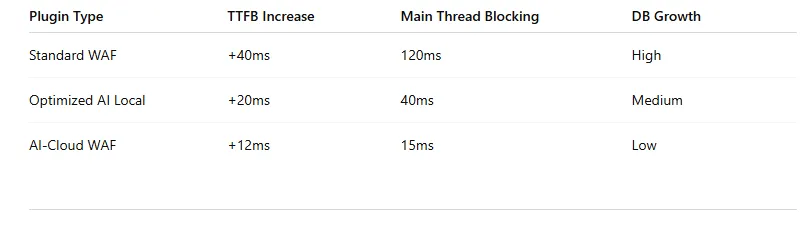
It’s faster because it changes where the work happens.
Pattern Recognition vs Signature Matching
Traditional security asks:
“Does this request match something bad we already know?”
AI asks:
“Does this request behave like something malicious?”
That shift eliminates:
- Massive signature downloads
- Repetitive regex execution
- Constant rule comparisons
Pattern models evaluate intent, not identity.
Edge Processing: Security Before WordPress Loads
Modern AI security increasingly lives at:
- DNS
- CDN
- Reverse proxy
By blocking threats before they hit PHP, WordPress remains untouched—and fast.
Cloudflare, Sucuri, and similar services prove one truth:
The fastest request is the one that never reaches WordPress.
Smart Logging: Killing Database Bloat
Old security plugins log everything.
AI filters noise.
Instead of writing millions of bot hits to wp_options, intelligent systems summarize trends and discard junk.
Smaller databases = faster queries = better TTFB.
The “Bloat” Audit: Scripts, Assets, and Hidden Weight
Security doesn’t only slow frontend pages—it quietly bloats everything else.
Frontend Impact
Ask three questions:
- Does the plugin load JS on every page?
- Does it inject inline CSS?
- Does it alter layout behavior?
If yes, CLS and LCP are at risk.
The best plugins load nothing unless absolutely necessary.
Admin-Side Performance
AI dashboards look great—but charts cost memory.
Poorly optimized admin pages can:
- Spike RAM usage
- Slow editorial workflows
- Trigger hosting limits
A fast site isn’t just frontend—it’s editorial too.
Recommendations: The “Fast & Secure” WordPress Stack
After testing, auditing, and breaking more sites than we’d like to admit, one truth emerges:
There is no single perfect security plugin. Only smart combinations.
The Speed-First Setup
- AI Cloud WAF (Cloudflare / Sucuri)
- Lightweight local hardening plugin
- Off-site malware scanning
This stack keeps WordPress lean and protected.
When to Avoid “All-In-One” Security
If a plugin offers:
- Real-time file scanning
- Live traffic logging
- Full firewall
- Malware cleanup
…all at once, expect performance tradeoffs.
Schedule heavy tasks.
Disable live views.
Let AI work quietly.
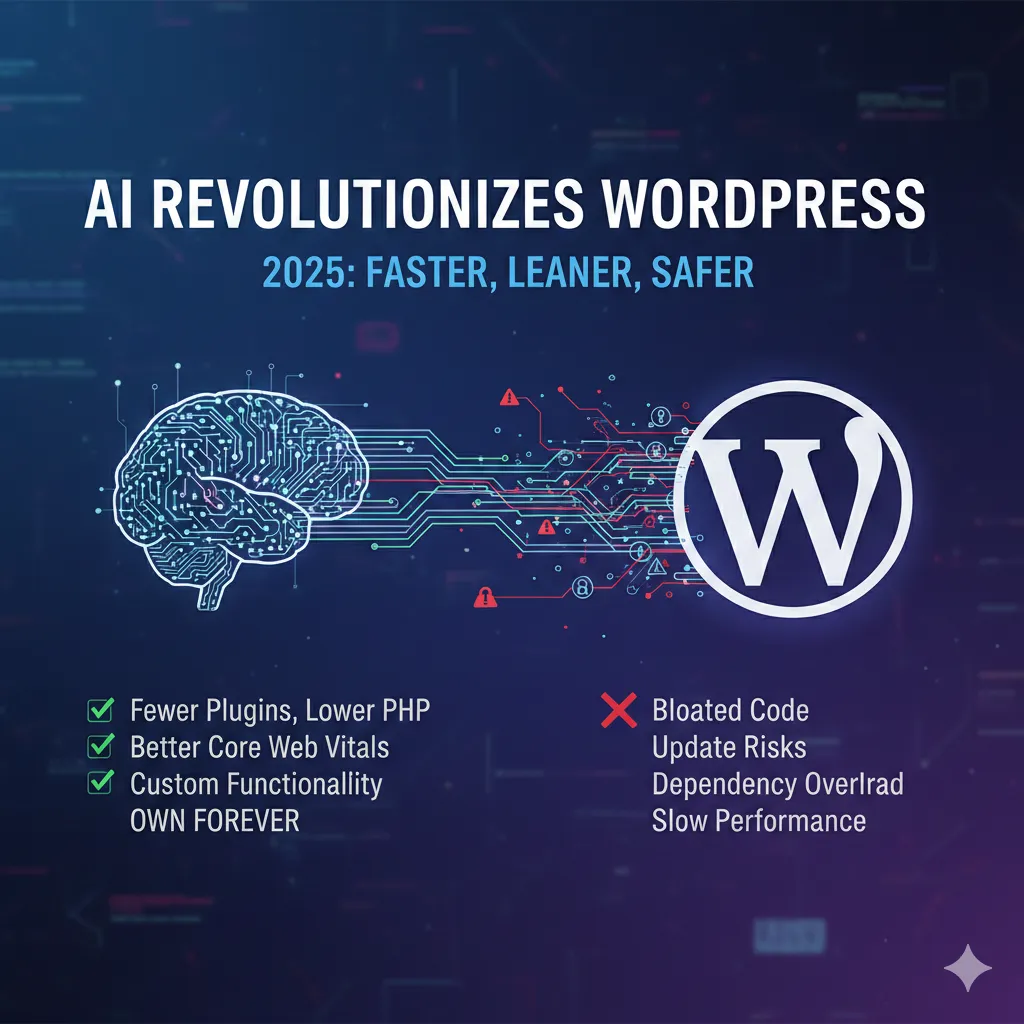
For more than two decades, WordPress plugins have been the default solution for every problem—but that convenience came with a hidden tax: bloat, subscriptions, and performance drag. In 2025, AI fundamentally changes that equation. Instead of loading heavy booking, form, calendar, and table plugins—each with its own scripts, database queries, and update risks—AI tools can now generate the same functionality externally and embed it directly into WordPress. The result is fewer plugins, less PHP execution, and dramatically lower strain on Core Web Vitals.
What makes this shift so important for performance is control. Traditional plugins lock features behind pricing tiers and rigid update cycles, often forcing unnecessary code onto the site. AI-built components, on the other hand, are created only with the features you actually need—nothing more. No live traffic logging, no background scans, no bloated admin panels. This lean-by-design approach aligns perfectly with modern performance goals: faster TTFB, cleaner main-thread execution, and improved LCP stability.
Most importantly, replacing plugin-heavy workflows with AI-generated systems removes one of WordPress’s biggest long-term risks: dependency overload. Every plugin adds attack surface, database growth, and potential conflicts. AI flips that model by letting site owners build once, own forever, and evolve features without waiting on third-party developers. In the context of security and speed, fewer plugins don’t just mean lower costs—they mean a faster, more resilient WordPress stack built for the realities of 2025.
Conclusion: Is AI a Core Web Vital’s Best Friend?
For the first time in WordPress history, security no longer has to be the enemy of speed.
AI-powered security—when architected correctly—reduces server load, protects Core Web Vitals, and scales with modern threats. Not because it’s flashy. But because it moves work away from WordPress and toward systems built to handle it.
The final verdict is clear:
Performance is no longer a valid excuse for weak security.
In 2025, the fastest WordPress sites are not the ones without protection.
They’re the ones protected intelligently.
And that changes everything.
Frequently Asked Questions
1. Do AI-powered WordPress security plugins really improve site speed?
Yes—when implemented correctly. True AI-powered security plugins reduce server load by relying on behavioral pattern recognition and edge-based filtering instead of constant signature matching. This means fewer database queries, less PHP execution, and minimal impact on metrics like TTFB, INP, and LCP. However, not all plugins labeled “AI” offload processing, so architectural design matters more than marketing claims.
2. Why do traditional WordPress security plugins slow down Core Web Vitals?
Traditional security plugins inspect every request at the PHP level using large rule sets and signature databases. This adds latency to Time to First Byte, blocks the main thread during scans or live traffic logging, and often injects JavaScript or CSS that delays Largest Contentful Paint. Over time, excessive logging can also bloat the database, further degrading performance.
3. What is the difference between AI-based security and signature-based scanning?
Signature-based scanning compares files and requests against known malware patterns, requiring frequent updates and heavy processing. AI-based security focuses on behavioral analysis—detecting anomalies in request patterns, execution flow, and intent. This significantly reduces repetitive checks and allows malicious traffic to be blocked earlier, often before WordPress even loads.
4. Is a cloud-based AI firewall better than a local WordPress firewall?
In most cases, yes. Cloud-based AI firewalls operate at the DNS or CDN level, stopping malicious requests before they reach your server. This eliminates the “firewall tax” on PHP execution and improves Time to First Byte. Local firewalls can still be useful for hardening, but relying solely on them often leads to performance tradeoffs.
5. Can I maintain a green Lighthouse score while using WordPress security plugins?
Absolutely. A green Lighthouse score is achievable by combining a cloud-based AI WAF with a lightweight local security plugin and off-site malware scanning. Avoid real-time file scans, excessive logging, and frontend script injections. Modern AI security allows WordPress sites to stay fast, secure, and fully compliant with Core Web Vitals—without compromise.